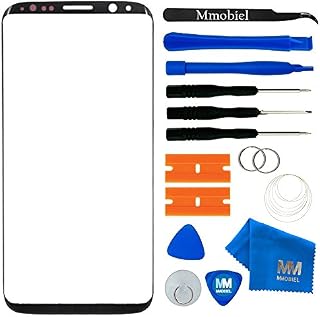
MMOBIEL Front Glass Repair Kit Compatible with Samsung Galaxy S8-5.8 inch 2017 - Lens Screen Replacement Repair Kit - Incl. Toolkit - Black by Amazon.co.uk
Currently Unavailable
- • Front Glass Display Outer Lens Compatible with Samsung Galaxy S8 SM-G950 2017 Incl. Toolkit - Black
- • Comprehensive repair Kit: Professional tool Kit including 1 x microfibre cleaning cloth, 1 x suction cup, 1 x spudger (lever tool), 1 x Pry Tool, 1 x Wipes, 1 x Sim Pin, 4 x Screwdrivers (Phillips #00, Phillips #000, Torx T2 and Pentalobe P2) for easier installation.
- • Compatible with Samsung Galaxy S8 SM-G950 2017 Important: Please check the Model Number of your device before purchasing this Item. You can find the Model type of your device on your device and / or in the settings.
- • Installation: We suggest to seek advice from a Professional before replacing the Front Glass Display.
- • This is an extremely technical procedure, please familiarize yourself with the process first, before you buy this set and before attempting it yourself: We cannot take any responsibility for damage incurred during the replacement process.
Compare MMOBIEL Front Glass Repair Kit Compatible with Samsung Galaxy S8-5.8 inch 2017 - Lens Screen Replacement Repair Kit - Incl. Toolkit - Black with other products:

Description
Package includes: Spudgers, plastic razor blades, cleaning cloth, plectrum, Suction Cup, Tweezers, Metallic Wire and Screwdrivers. The Wire will allow you to gently and safely remove the glass from your LCD without picking and prying. This removal method is favored by professional technicians. Included tools usable for multiple repair jobs and devices
Compatibility: Compatible only with Samsung Galaxy S8 G950 Series G950F (Europe, Global Single-SIM); G950FD (Global Dual-SIM); G950U (USA Unlocked); G950A (AT&T); G950P (Sprint); G950T (T-Mobile); G950V (Verizon); G950R4 (US Cellular); G950W (Canada); G950S/G950K/G950L (South Korea); G9500 (China) - 5.8 Inch NOT with S8 Plus G955 Series Important: Please check the Model Number of your device before purchasing this Item. You will find the Model Number on the back of your device or in the settings
Additional tools maybe needed for this repair: Please check also instructional Video on youtube in order to prepare your repair job.
This is an extremely technical procedure, please familiarize yourself with the process first, before you buy this set and before attempting it yourself: We cannot take any responsibility for damage incurred during the replacement process.
| | | | | ||||||||||||||||||||
|---|---|---|---|---|---|---|---|---|---|---|---|---|---|---|---|---|---|---|---|---|---|---|---|
| Step 1 Before you start, please turn off your Samsung Galaxy S8. Remove the SIM Tray. HEat the back of your Samsung Galaxy S8 to soften the adhesive and use an oening pick or an MMOBIEL Oening Tool and slide it in between the back cover and the mid frame to break the adhesive. | Step 2 After breaking up all the Samsung S8 Adhesive, open up the back cover like a book. PLease be sure to do this carefully since there is a Fingerprint Sensor Cable connectoed to the Logic Board that needs to be disconnected. | Step 3 Remove the Adhesive from the Samsung S8 Midframe. | Step 4 Remove the following Screws
|


![4youquality [3-Pack] Samsung Galaxy S8 Screen Protector, Tempered Glass Film [LifetimeWarranty][Full Coverage][Scratch-Resistant] Screen Protector for Samsung Galaxy S8](https://m.media-amazon.com/images/I/712yWidQBLL._AC_SL640_.jpg)
![Samsung Galaxy S8 Case,ORETech Galaxy S8 Cover with [Shock-Absorption Bumper] Soft Gel Silicone TPU Edge and Transparent Back Cover Full Body Protection Shockproof Case for Galaxy S8 - Black](https://m.media-amazon.com/images/I/81FYXWHIJyL._AC_SL640_.jpg)