




MUNBYN Thermal Printer, 80MM Receipt Printer, Label Printer, Direct Thermal Receipt POS Printer with USB Ethernet Port For Restaurant, Shop, Home Business ESC/POS Support Windows, Mac,Linux, Chrome OS by Amazon.co.uk
- • 【Please Note】Connection: USB or Ethernet. Do NOT support DoorDash. No iOS devices, such as iPhone and iPad. We are working on improving the compatibility.
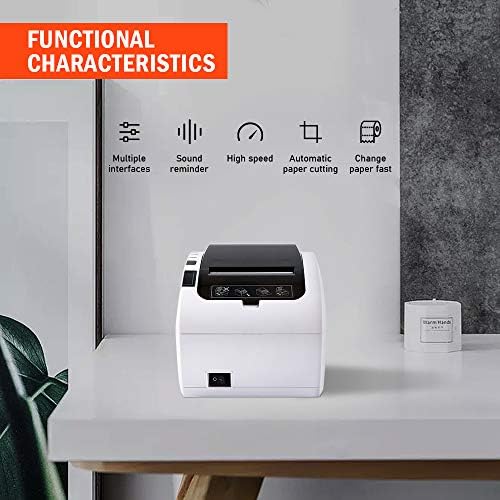
- • 【Print Fast & Auto Cutter】 MUNBYN POS printers adopt high-speed printing technology, and support printing 45+ receipts per minute (250mm/sec). Easy to install and use. The automatic paper cutter makes receipts more organized, which will improve the efficiency of your growing business.
- • 【More Cost-effective】Compatible with Square Register via Ethernet. Support printing directly from Mac, Windows, or Android systems via USB or Ethernet. Note: MUNBYN offers excellent technical support. We will serve you and help you wholeheartedly.
- • 【Large Application Range】 This receipt printer is a better choice for your retail stores, grocery stores, clothing stores, supermarkets, cafes, ticket points, food trucks, banks, restaurants, or any other business that uses receipts.
- • 【Important Tips】 1. The user manual provides clear instructions for installing the printer driver. 2. The receipt printer supports Windows, Mac, Linux, and Chromebook systems based on ESC/POS commands. 3. Offer a new “USB Flash Drive” that contains the printer driver, user manual, SDK, Tools, and how-to videos! All the information you need has been written to the USB drive, so just read it. 4. Does not work with Square Stand, Square Stand Mount, Square Terminal, iPhone, and iPad.
- • 【Wall Mount Design】 The receipt printer supports wall mount installation. There are two hanging holes at the bottom. Easy to use, stable work, and space-saving. Paper width: 3 1/8 (80mm).
- • 【Professional Service】MUNBYN has a professional pre-sale/after-sale service team. If you have any questions about compatibility or need more help with setup, please feel free to come to our technician via email / WhatsApp. We will do our best to resolve the problem.
Description
USB+Ethernet
USB+Seria+Ethernet
USB+Seria+Ethernet
USB+Seria+Ethernet
USB
80mm*50mm
Support system
Windows/Linux/Mac/Chrome
Windows/Linux/Mac/Chrome
Windows/Andriod/Linux/Mac/Chrome
Windows/Andriod/Linux/Mac/Chrome
Windows/Linux System/macOS
Print Speed
300 mm/sec
300 mm/sec
300 mm/sec
300mm/sec
300mm/sec
Auto Cutter
✓
✓
✓
✓
NV logo printing
✓
✓
✓
✓
✓
Wireless Connection
Bluetooth
Wifi
MUNBYN 80MM FASHION THERMAL RECEIPT PRINTER
Some important information about this receipt printer:
3-inch
thermal receipt printer with auto-cutter and fast printing speed--230 mm/sec
.
Support Windows, MAC, Linux systems
. Special software is required on mobile devices. DO NOT have BlueTooth/WIFI.
If you wanna connect the printer via ethernet cable to share the printer by multiple computers, you can set it with the guide of User Manual
.
You can install the Printer Driver
according to User Manual within 8 steps.
You can add LOGO
on every receipt from "Setting Tool
" along with Printer Driver.
Provide storage for direct access to printer driver and manual.
This printer DOES NOT
have Bluetooth or WIFI.
Reliability print:100KM
PRODUCT DESCRIPTION
Printing method: Direct thermal
Printing speed:230mm/sec
Printing width:72mm
Paper diameter:79.5\xb10.5mm\xd7\u03c680mm
Paper thickness:0.06~0.08mm
Interface: USB+LAN
Auto-cutter: Partial
Cutter lifespan:10 million times
Reliability print:100KM
Clear Printing Text & No Extra Ink Spend
High precision printers can print outstanding clear text.
No need for any ink, save on expensive ink cartridges.
New USB Flash Drive
The USB Flash Drive contains the printer driver, user manual, software manual, hardware manual, and some videos to guide printer \u200boperation.
All information you need is inside the drive, so be sure to view it.
Quiet & High Efficient
High-performance printer, giving you a quiet and efficient working environment.
A stable USB or Ethernet Connection ensures the printer will work great during working hours.
How to install the printer driver?
Insert the power cable
into the thermal printer.
Connect the printer with windows PC via USB cable
.
Place a thermal paper roll into the printer, and turn on it
.
Following the User Manual
to install the printer driver.
Tip 2: Does this printer work with Uber Eats ?
Dear customer, we are sorry to tell you that this receipt printer P047 does not work with Uber Eats
. But we are working on a breakthrough
. For more compatibility, please feel free to ask us.
We will serve you wholeheartedly.
Tip 3: How to connect the printer to PC via Ethernet cable\uff1f
Insert the power cable
into the thermal printer.
Connect the printer to the router via Ethernet cable.
Place a thermal paper roll into the printer, and turn on it.
Following the User Manual
to install the printer driver and add a new port on your computer.
Tip 4: How to connect the printer with a cash drawer?
Connect the cash drawer through RJ11/RJ12 cable
.
Install the printer driver and set cash drawer from Printer Properties.
Set Open cash drawer before printing from Device Settings.
Tip 1
Tip 2
Tip 3
Tip 4
Product information
- Brand:MUNBYN
- Connectivity technology:USB, Ethernet
- Printing technology:Thermal
- Special feature:Energy Star
- Colour:White
- Recommended uses for product:Restaurant
- Series:ITPP047UE-WH-UK
- Printer output:Direct Thermal Printing
- Max print speed monochrome:72 ppm
- Operating System:Windows
- Product Dimensions:13 x 19 x 13.5 cm; 1.74 Kilograms
- Item model number:ITPP047UE-WH-UK
- Manufacturer:MUNBYN
- Form Factor:Printer
- Connectivity Type:No
- Number of Firewire Ports:2
- Wattage:18 watts
- Power Source:DC
- Hardware Platform:Linux/Windows PC
- Are Batteries Included:No
- Item Weight:1.74 kg
- Guaranteed software updates until:30 July 2022
Related products to MUNBYN Thermal Printer, 80MM Receipt Printer, Label Printer, Direct Thermal Receipt POS Printer with USB Ethernet Port For Restaurant, Shop, Home Business ESC/POS Support Windows, Mac,Linux, Chrome OS:


Explore other categories
Other products from Receipt Printers:


