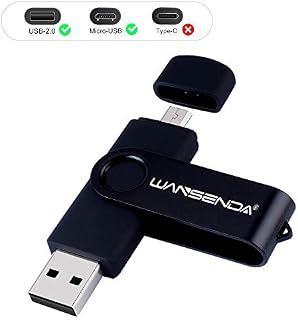
Wansenda S100 OTG USB Flash Drive 16GB 32GB 64GB 128GB USB 2.0 For Android Devices/PC/Tablet/Mac (32GB, Purple) by Amazon.co.uk
- • Plug and play, no need to install any software.
- • Portable, lightweight, 360 degree swivel design.
- • Provides additional storage for your Android devices.
Compare Wansenda S100 OTG USB Flash Drive 16GB 32GB 64GB 128GB USB 2.0 For Android Devices/PC/Tablet/Mac (32GB, Purple) with other products:


Description
*** Make sure your device has OTG function and features Micro USB *** *** Not Suitable for iphone or ipad as they are lightning port *** *** Not for Type-c port ***
About the Wansenda OTG Memory Stick
\u25ba Micro-USB and USB-2.0 connector for Data Transfer
- 2 IN 1 Standard USB 2.0 port and Micro USB port, make it easier to share and transfer data between multiple devices, swiftly free up plenty of space on your device, enjoy more comfortable moments.
\u25ba Plug and Play, Easy to Use
- Easy to transfer and share photos, videos, songs and other files between most of (Android and Micro USB) smart phones or tablets with OTG Function and computers.
- Document viewer for all major file formats.
\u25ba Keep your device more storage
- Directly plug the Memory Stick into your Android device with micro USB, transfer your memories and make space for new ones.
- You'll always have plenty of storage available, easily solve the problem of insufficient memory.
Please Kindly NOTE
\u25ba A+ Level High-efficiency Chip
- Adopt A+ Level original high-quality chip to strictly ensure the high-precision and high stability of data transmission, excellent chip assembly technology makes data more secure.
- All the Wansenda products are produced and checked under Strict Quality Inspection before we shipped them out,and we are always standing behind our products.
- We are trusted by a host of buyers from all over the world ! Your satisfaction is our pursuit !
\u25ba Important Note
** Make sure your device has OTG function
** Make sure your device features Micro USB
** Not Suitable for Type-c, iphone or ipad
- Please don’t power off your computer or other device when transferring files, otherwise it may lead to data loss.
- The special nature of raw materials may lead to slightly different color differences between batches.
\u25ba 32GB: available capacity is about 28GB-30GB
16GB: available capacity is about 14GB-15GB.
64GB: available capacity is about 58GB-60GB.
128GB: available capacity is about 110-120GB.
256GB: available capacity is about 230-240GB.
- Some of the listed capacity on a flash storage device is used for formatting or other functions and thus is not available for data storage. As such, the actual available capacity for data storage is less than what is listed on the products.
Storage -
Perfect for keeping all of your documents, videos, music and photos handy.
\u25ba How to connect to phone?
- There are two Methods to transfer data to the USB memory stick due to the different Android phones.\uff08Please open the Phone's OTG function first
\uff09 If your phone can not work, please make sure your device features Micro USB Port and support OTG function, not all mobile phones and tablets can support OTG function. And you need open mobile phone set open OTG connection.
\u25ba Method One:
1. Plug Wansenda usb memory stick into your Android phone, check the top of Android phone for the USB symbol, it says \u201cUSB storage\u201d connected. Go to "My Files" to select the pictures, videos or audios you will see your files there.
2. Click on \u201cCopy\u201d or \u201cMove\u201d by breaking down menu on the top right corner, then go to the folder you want to move your files to. At the top/bottom you will see 'Paste Here', once you do that, your files will be copied or moved to that folder.
3. Glide your finger downward on the phone's home screen to display the notifications panel to back to the \u201cGeneral USB Drive\u201d to eject or uninstall usb drive.
\u25ba Method Two:
1. Connect the USB Memory Stick to your Android phone, and glide your finger downward on the phone's home screen to display the notifications panel.
2. Tap the information as "General USB Drive", \u201cUSB storage\u201d or \u201cOTG\u201d alert, you will see some existing folders.
3. Click the folder to open the files, choose the files to \u201ccopy to\u201d or \u201cmove to\u201d the folder you want to. Glide your finger downward on the phone's home screen to display the notifications panel to back to the \u201cGeneral USB Drive\u201d to eject or uninstall the usb drive.
OTG USB 2.0 Memory Stick
Capacity
16/32/64/128/256 GB
32/64/128/256/512 GB
32/64/128/256/512 GB
128/256 GB
128 GB
Interface
USB 2.0 + Mirco USB
USB 3.0 + Type C
USB 3.0 + Type C
USB 3.0 + Type C + Micro USB
USB 3.0 + Type C + Micro USB
Dimension (inch)
2.7*0.6*0.3
2.7*0.6*0.3
2.5*0.6*0.2
2.7*0.6*0.3
2.5*0.6*0.2
Material
Metal + Plastic
Metal + Plastic
Metal + Plastic
Metal + Plastic
Metal + Plastic
Compatible Devices
Computer / Smartphone (with Micro USB port) / Tablet (Micro USB)
Computer / Smartphone (with Type C port) / Tablet (Type C)
Computer / Smartphone (with Type C port) / Tablet (Type C)
Computer / Android Phone (with Type C or Micro USB port) / Tablet
Computer / Android Phone (with Type C or Micro USB port) / Tablet
Product information
- Brand:WANSENDA
- Memory storage capacity:32 GB
- Hardware interface:USB 2.0
- Special feature:Stable, Easy to use
- Colour:Purple
- Product Dimensions:7.19 x 1.98 x 1.09 cm; 11.91 Grams
- Item model number:WSD-S100
- Manufacturer:WANSENDA
- Color:Purple
- Processor Count:24
- RAM Size:128 GB
- Computer Memory Type:DDR3 SDRAM
- Hard Drive Interface:USB 2.0
- Hardware Platform:Android
- Operating System:Android
- Are Batteries Included:No
- Item Weight:11.9 g
Related products to Wansenda S100 OTG USB Flash Drive 16GB 32GB 64GB 128GB USB 2.0 For Android Devices/PC/Tablet/Mac (32GB, Purple):


Explore other categories
Other products from USB Flash Drives: