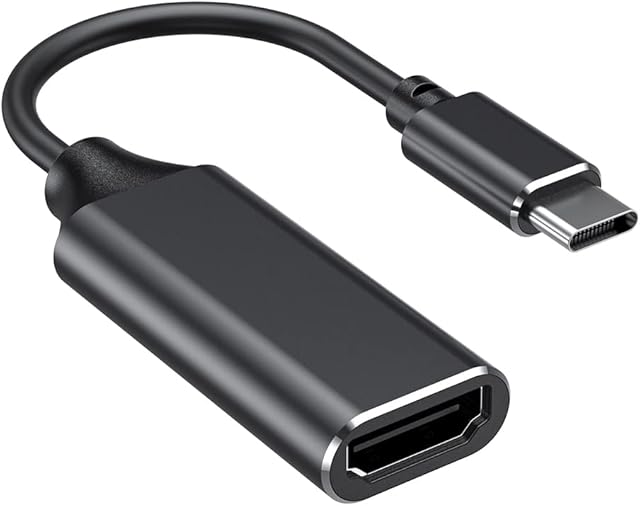
USB C to HDMI VGA Adapter, USB-C to HDMI 4K Multiport Adapter for MacBook Pro/MacBook Air/ipad Pro/Dell XPS/Nintendo Switch with Thunderbolt 3 Port by Amazon.co.uk
Compare USB C to HDMI VGA Adapter, USB-C to HDMI 4K Multiport Adapter for MacBook Pro/MacBook Air/ipad Pro/Dell XPS/Nintendo Switch with Thunderbolt 3 Port with other products:


Description
Does your MacBook Pro need to connect to multiple devices simultaneously?
Do you need a multi-functional portable usbc to hdmi adapter to work on the go?
Looking to extend the screen to an additional display?
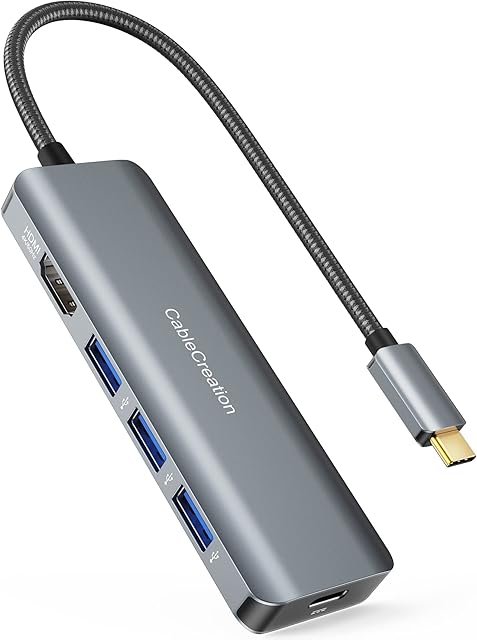
Here is intpw USB type C hub, premium design, a compact and slim size saves space on your desk, with an anodized aluminum exterior selected to match high-end laptops.
The USB C dongle for Mac Pro & Mac Air has one VGA port, one HDMI port, one USB 3.0 port and one USB C Charging port. Thin and sleek precision milled aircraft grade aluminum shell makes it possible to heat dissipation quickly and makes it easy to travel with.
1 * HDMI Port
and 1 * VGA Port
: Supports for Mirroring and Extending mode at 4K@30Hz
and 1080p@60Hz
, resolution can only reach up to 1080P when the HDMI and VGA output ports work simultaneously
1 * USB 3.0 Port
: High speed data transfer, which is 10 times faster than 2.0 ports.
1* USB C PD Charging Port
: 100W pass through charging allows each device to take only the power it requires.
Single Video Resolution Configurations:
Single HDMI: 3840x2160@30Hz
Single VGA : 3840x2160@30Hz
Dual Video (2 displays) Resolution Configurations:
HDMI & VGA Work Simultaneously : 1080P@60Hz
Please Noted: The final resolution of HDMI output depends on your host devices, (Only when your devices support 4K resolution, the video output will be 4K).
Intpw Portable USB C to HDMI Adapter
USB-C laptop (with Thunderbolt 3 port or USB 3.1 Type-C Gen2) must support DisplayPort alt mode and power delivery. The USB-C to VGA HDMI adapter can output to a display, a projector at the same time, a good choice for your presentations, conferences, workshops and lectures.
usb 3.0 hub High Speed Data Transferring
intpw Macbook Pro USB adapter for connecting and charging USB-A compatible devices and peripherals while syncing a complete music library or an entire vacation’s photo album nearly instantaneously with 5 Gbps
data transfer.
Note: For a stable connection, don’t connect high-power devices exceeding a combined current of 900mA such as Apple Super Drive.
Charge & Use Simultaneously
Enjoy full-speed pass-through charging while using a cable capable of supporting 100W. Maximum input of 100W for the hub’s operation allows the hub to give your MacBook Pro up to 61W (13 \u201d)
and 87W(15\u201d)
pass-through charge while connecting peripherals, syncing data, or displaying media via HDMI.
4K UHD Vivid Video
Innovative VGA HDMI output, Easily streams the vivid 4K Ultra HD media to monitors, projectors, and HDTVs
Supports for Mirroring and Extended mode
Note\uff1a It's normal that the hub gets hot when you are transferring videos. Our intpw USB to HDMI adapter at work are always considerably cooler than the industry standards and other products on the market.
Full HD 1080P@60HZ video
Stream Full HD 1080p video to HDTV, monitors, easily fulfill your daily use, effectively work in gaming, working and entertaining.
backward compatible with 1080i, 720p, 576p, 480i/480p
. NOTE: The resolution can only reach up to 1080p when the HDMI and VGA output ports work at the same time.
Mirror or Expand - Your Choice
If you are running a Windows system and want to extend the external monitor, switch the mode with the "Windows + P" key or click the mouse on the "Intel Graphics Settings" desktop and select the "Extend" mode.
For Apple computer (MAC OS) users, Mac OS system does not support triple display. Mirror mode only.
Important FAQ
Q1: Why not the HDMI port working properly ?
A: Firstly, make sure your device is supported video output, then try to replace the host device / HDMI cable/DP cable for testing.
Q2: Is the video signal interrupted ?
A: The signal interrupt is due to computer screen resolution and refresh rate setting, you had better to set the appropriate refresh rate.
Q3: Can't reach 4k/8k?
A: The final resolution performance of HDMI output depends on the resolution supported of your devices. (Only when your devices and hdmi cable support 4K/8K resolution, the video output will be 4K/8K)
Q4: When use the computer's HDMI port firstly, next connect the display through the hub's VGA port, the display does not work?
A: First look at whether the computer itself is supported video output, then pull the HDMI cable, test if the VGA port can be used, if you can use it properly.
Q5: Does this hub support 1440@60 Hz?
A: It can't support 1440 @ 60 Hz, but it can perfect support 1080@60 Hz. In fact, most USB C HUB or HDMI lines on the market cannot support 1440@60Hz or 4K@60 Hz.
Q6: When connect with VGA and HDMI at the same time, it is unable to extend different display, and the picture quality is less than 4K?
A: Multi-stream transfer (MST): All connected displays can display different content, but Mac OS does not support MST technology.
Single-Stream Transport (SST): All connected displays will display the same content.Then determine if the lower wire is 2.0 or DP1.4 wire.
Wide Compatility
Systems Compatility
Mac OS X; Windows 7/8/10; Linux; Chrome OS. Mac OS only supports Mirror mode.
Laptops Compatibility
Compatible with most USB-C laptops (with Thunderbolt 3 port or USB 3.1 Type C Gen2 port)which support DisplayPort Alt mode and power delivery.
Monitors Compatibility
Support single HDMI display up to 4K@30Hz (3840*2160@30Hz) for Macbook and windows laptops. The final resolution performance of HDMI output depends on the resolution supported of your host devices. (Only when your devices support 4K resolution, the video output will be 4K.) Resolution can only reach up to 1080P when the HDMI and VGA output ports work simultaneously\uff0cThe display will only duplicate and not extend.
Devices Compatibility
MacBook Pro 2016-2021/MacBook 2015-2021/MacBook Air 2018-2021/iMac Pro 2018 2017 Dell XPS13/XPS15/Inspiron 15 7000/ Inspiron 13 7000 HP Spectre 13/Spectre X360/ENVY 13/ENVY X360/HP EliteBook Folio G1 Google ChromeBook/ ChromeBook Pixelbook/ASUS ZenBook3/ZenBook Pro/ZenBook Flip/ZenFone 3 Ultra/Liquid Jade Primo/Lenovo Yoga 920 / 910 / 720/Huawei Matebook
After-sales Service
If you are unsure whether your device is compatible, please let us know and we will be pleased to assist you in determining whether the adapter will work with your device. For any other questions, please let us know and you have right to get a free replacement set on any reason.
Package Included
1 USB C to HDMI VGA adapter, 1 user manual, 1 exquisite box.
HDMI Port
1
1
2
1
2
Max Resolutions Supported
✓
✓
USB C PD Charging Port
✓
✓
✓
✓
✓
✓
USB 3.0 Port
1* USB 3.0 up to 5Gbp/s
1* USB 3.0 up to 5Gbp/s
1* USB 3.0 up to 5Gbp/s
1* USB 3.0 up to 5Gbp/s
3* USB 3.0 up to 5Gbp/s
USB 3.1 Port
2* USB-C 3.1 ports & 1* USB-A 3.1 ports up to 10Gbp/s
SD/TF Slot
✓
✓
DP Port
✓
Thunderbolt Port
✓
Product information
- Compatible devices:Gaming Consoles, Tablets, Laptops
- Connector type:Usb, HDMI
- Connector gender:Female-to-Male
- Colour:Gray
- Item dimensions L x W x H:9 x 5.4 x 1.4 centimetres
Related products to USB C to HDMI VGA Adapter, USB-C to HDMI 4K Multiport Adapter for MacBook Pro/MacBook Air/ipad Pro/Dell XPS/Nintendo Switch with Thunderbolt 3 Port:


Explore other categories
Other products from DVI to HDMI Adapters:
![USB C to HDMI Adapter, Benfei USB Type-C to HDMI Adapter [Thunderbolt 3 Compatible] for MacBook Pro 2018/2017, MacBook Air/iPad Pro 2018, Samsung Galaxy S10/S9, Surface Book 2 and More - Gray](https://m.media-amazon.com/images/I/614SFXDNcML._AC_SL640_.jpg)