

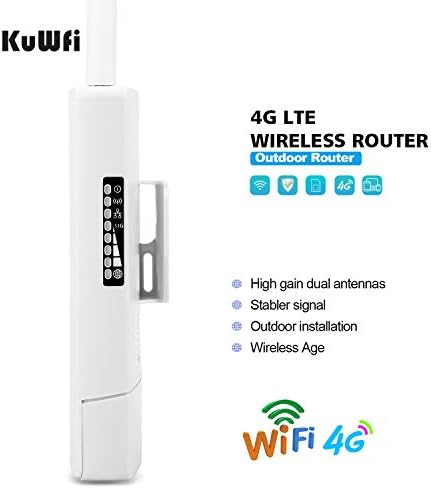


300Mbps 4G WiFi Router, KuWFi Waterproof LTE Wireless Outdoor CPE Cat4 High Gain Dual Antennas with SIM Card Slot Used in Monitoring Camera work with the whole Europe by Amazon.co.uk
- • \u3010What CPF905 is\u3011 KuWFi CPF905 is a outdoor 4G LTE CPE router designed for WIFI users to get access to internet via UMTS/HSPA/LTE. It is used to supply internet access to indoor & outdoor WiFi coverage and monitor camera project\uff08In addition, it has the function of converting 4G to WiFi hotspot\uff09It can be connected to 10 devices at the same time. The coverage of the signal is 300-500M, which mainly depends on the strength of the signal.
- • \u3010 4G network band \u3011 CPF905 is compatible with the frequency bands of SIM cards in most European countries. Frequency BandsFDD:B1,B3,B5,B7,B8,B20;TDD:B38,B39,B40,B41;WCDMA:B1,B5,B8;WCDMA:B1,B5 ,B8;EVDO BC0;GSM:900/1800MhZ. Please you confirm whether your SIM card frequency band is compatible with it before buying a router. Unlocked mean work with any sim card but the sim card network Frequency band should be support the router network band.
- • \u3010 Main feature Performance \u3011 KuWFi CPF905 LTE CAT4 up to 150Mbps IP66 Waterproof and the wireless transmission speed rate is 300mbps. come with 12V 1A Power Supply and work with 10 Users includng 1* WAN/LAN port and one sim card slot Working temperature -20\xb0 to 75\xb0,Ethernet mode :dynamic/PPPOE/LAN It is suitable for installation in home/office/factory/warehouse/garden/ parking lot . Dual high gained external antenna one is 4G antenna and one is WiFI antenna.
- • \u3010HOW TO USE \u3011Even if your SIM card is compatible with CPF905, it is not necessarily plug and play, maybe you need to disable the PIN code of the SIM card and modify the APN . About the APN:You can find the APN of the SIM card from the carrier's official website or mobile phone. Please you make sure the SIM card is activate, It not support roaming service and Virtual SIM Card and IoT SIM Card; In rural area did not cover good signal some time disconnect ,that is normal.
- • \u3010Customer Service\u3011For 30 days after the date of purchase, return your undamaged JuHUi product and receive a full refund for ANY reason.12-month warranty for quality-related issues For 12 months after the date of purchase. we take care of all quality-related issues with a REPLACEMENT OR FULL REFUND. We shot the installation video, please check out the YouTube video: https://youtu.be/Fi8433j8n2Y
Compare 300Mbps 4G WiFi Router, KuWFi Waterproof LTE Wireless Outdoor CPE Cat4 High Gain Dual Antennas with SIM Card Slot Used in Monitoring Camera work with the whole Europe with other products:


Description
Operation system
PC Users: A PC with Windows XP (SP3), Windows Vista (SP1), Windows 7,or Windows 8
MAC Users: A Mac with OS X v10.5.7,OS X Lion v10.7.3 or later
IPAD Uers: An iPhone, iPad, or iPod touch with iOS 5 or later
Android Uers: An mobile Phone or Tablet PC with Android 2.3 or later
Please notice:
It is compatible with the frequency bands of SIM cards in most European countries. But you need confirm whether your SIM card frequency band is compatible with it before buying a router.
If the frequency band of your SIM card is compatible with CPF905, but your device cannot connect to the Internet normally, you need to disable the PIN code and modify the APN. (the info can consult operator)
If signal is unstable, you can also manage the settings page, lock 4G or 3G network, can effectively improve the stability of the network.
If your settings are correct and the device still cannot connect to the network, please consider whether it is caused by the following problems:
Account got suspended for too much data usage.
Is the SIM card an IoT card?
the sim card have limited service ,not work with router or hotspot .
not support roaming service.
some place did not cover the network Frequency band.
High Speed 4G WiFi Antennas
Transfer rate
up to 150Mbps DL
up to 50Mbps UL
HSDPA up to 42.2Mbps DL
HSUPA up to 11.5Mbps UL
3.1Mbps DL
Waterproof Outdoor CPE Router
IP 66 WATERPROOF
IP 66 waterproof case
Anti-UV
Corrosion resistant
Suitable for outdoor installation
Operating Environment
Working temperature\uff1a -20\xb0 to 75\xb0C
Working height\uff1aCurrent tested max height 3000m (10,000 inches)
External Ports
External Ports
SIM\uff1a3FF Micro SIM Card(SIM card is NOT including)
USB\uff1aUSB TYPE A (5V 1A IN)
DC\uff1a12V 1A IN
RJ45\uff1a1* WAN/LAN
Support frequency Band (NOT support USA)
4G FDD LTE: B1,B3,B7,B8,B20
4G TDD LTE: B38,B39,B40,B41
WCDMA\uff1aB1,B8
GSM\uff1a900/1800MhZ
EVDO BC0
Please you confirm whether your SIM card frequency band is compatible with it before buying a router.
You may need to manually configure the APN when using the new operator network.
Support up to 10 users
Internet connection sharing, up to 10 users can access the WiFi network at the same time. Able to connect with Tablet ,Laptop, notebook, IP cameras and different types of WI-FI devices.
Product parameters and interfaces type
HW_VER\uff1aCPF905\uff0dV1.0
MTK Chipset\uff1aMT6735WM
Wi-Fi Chipset\uff1aMT6625L
RAM/ROM\uff1a4GByte EMMC+512MByte DDR2
Wi-Fi\uff1aIEEE 802.11b/g/n
Encryption\uff1aWi-Fi Protected Access (WPA/WPA2)2
Soft SIM\uff1aesim or softsim
Customization\uff1aSmart system,high-level\uff1bCustomization possibility
LED\uff1aLED indicator
Installation Steps
1
Press mount E, remove the cover C, insert SIM card, and plug ethernet cable, power cable according to the sign, close the cover
2
Use the metal strap, go from A to C through the mounting hole, adjust the size according to the pole size
3
Mount the device on the pole, tighten the strap by screwdrivers or pliers
How to Set It Up
Please insert the SIM card first, and then connect the product to the power supply.
The next step is to connect the SSID, the SSID is 4G-CPE_xxxx, and The password for the SSID is 1234567890.
For more setting information about the router:
Please open your browser, enter the router's IP address \u201c 192.168.199.1\u201d, and click Enter. Then please enter admin in the password, and click Enter.
The following is how to set the APN:
You need to click on "APN" in "network settings" and then click on "add new".
Please fill in "Profile Name", "APN", "mcc" and "mnc" and click "Apply".
The following is how to change the IP address:
You need to click disconnect next to the network connection option on the homepage. Then click router setting to modify and Apply.
Supported frequency band
4G FDD LTE: B1/B3/B7/B8/B20 4G TDD LTE: B38/B39/B40/B41
4G LTE FDD:B1/B3/B7/B8/B20 4G LTE TDD:B38/B39/B40/B41
4G LTE-FDD: B1/B3/B5/B7/ B8/B20 4G LTE-TDD: B38//B40/B41
Data transfer rate
Download speed 150 mbps; Wireless transmission speed 300 mbps
Download speed 150 mbps; Wireless transmission speed 300 mbps
Download speed 150 mbps; Wireless transmission speed 300 mbps
Supported SIM card size
Micro
Standard
Nano
Number of antennas
2
4
Built-in antenna
Number of users supported
10
10
32
Power supply type
DC
DC
POE
Supported communication technology type
4G/3G
4G/3G
4G/3G
Product information
- Brand:KuWFi
- Frequency band class:Single-Band
- Wireless Type:802.11b
- Compatible devices:Mobile phone; computer; television
- Frequency:1800 MHz
- Recommended uses for product:Home, Business
- Connectivity technology:Wi-Fi, USB, Ethernet
- Colour:4G router
- Operating System:Windows XP, Windows Vista, Windows 8, Windows 7
- Security protocol:WPS
- Package Dimensions:21.2 x 16.6 x 6.4 cm; 460 Grams
- Manufacturer reference:CPF905
- Manufacturer:KuWFi
- Color:4G router
- Connectivity Type:Wi-Fi
- Voltage:12 Volts
- Are Batteries Included:No
- Item Weight:460 g
Related products to 300Mbps 4G WiFi Router, KuWFi Waterproof LTE Wireless Outdoor CPE Cat4 High Gain Dual Antennas with SIM Card Slot Used in Monitoring Camera work with the whole Europe:


Explore other categories
Other products from Routers:


