

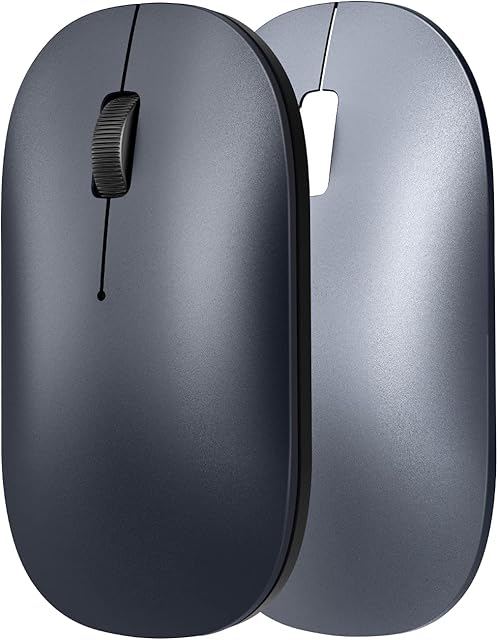
ANEWISH Wireless Bluetooth Mouse for Laptop / Macbook / iPad / iPhone (iOS13.1.2 and Later), Rechargeable Noiseless Mini Mouse Compatible with Android/ Windows/Linux Black by Amazon.co.uk
- • Please identify the shop: 'TengDi '\U0001f44dBluetooth Stably and fast connected:Built-in advanced sensor, no need to install any driver or software,open bluetooth on device and connect it. connection automatically every time when open your computer (compatible bluetooth 5.0/4.0 / 3.0 / 2.0 ).\U0001f44dif you use wireless mouse on iPad/iPhone,please upgrade IOS to 13 or higher,1: open bluetooth 2\uff1aclick: Setting-Accessibility-Touch-Assistive touch (open it) -Devices-find and connect "Bluetooth mouse"-Enter match code '0000' or '1234'
- • \U0001f44dSilent Click: Reduce noise by up to 90%, Almost no noise when your computer is running, ideal Mouse for office, home and leisure. Ergonomic and comfortable grip, The surface coating gives you a soft touch.
- • \U0001f44dRechargeable with lithium battery: Mouse is supplied with a USB cable for recharging, you can use it even when recharging. Battery low will cause the cursor to be inaccurate and Bluetooth to disconnect.The two-hour charger allows use of 3-4 weeks, standby in automatically when not use.The mouse's battery may be exhausted due to long-term transportation, Please charge the mouse after received
- • \U0001f44dSuper compatibility: Compatible with Windows, iPad / iPhone(iOS 13.1.2 and later version), Mac OS X (not for Mac OS 10.13.3 and Mojave system), Compatible with Android and Linux.Macbook, Tablet, Lenovo, Asus, HP, Surface, etc. .how to connet MAC: Make sure your macs are using the genuine system and not the trial system( no need to enter the pin code, find the mouse on you MAC, click OK to confirm directly)
- • \U0001f44dPortable and Easy to Use: lightweight 69g mouse, Easy to control, is easy to store in a laptop bag, which is perfect to take it with you. 3 adjustable DPI levels (800-1200-1600 DPI), allow you to freely control the speed of the mouse. And the shape allows right hand / left hand to use. Its matt black color makes it even more beautiful
- • \u2765\u2765warranty One year, Any questions, please email us to get up to professional guidance and Convenient after-sales service
- • how to connet MAC: Make sure your macs are using the genuine system and not the trial system( no need to enter the pin code, find the mouse on you MAC, click OK to confirm directly)
Compare ANEWISH Wireless Bluetooth Mouse for Laptop / Macbook / iPad / iPhone (iOS13.1.2 and Later), Rechargeable Noiseless Mini Mouse Compatible with Android/ Windows/Linux Black with other products:


Description
no need to enter the pin code, find the mouse on MAC ,pin code has been automatically filled in, then click directly to confirm
Common questions and answers
Q1: Why can't the mouse connect to your MAC Laptop/iPad? !!!
A1 : Very sorry! Please check if your version is updated to iOS 13.1.2 OR later version. For IOS system Laptop/iPad, our mouse is only compatible with iOS 13.1.2 or later version.
Q2\uff1ahow to connet MAC?
A2 :Make sure your macs are using the genuine system and not the trial system( no need to enter the pin code, find the mouse on you MAC, click OK to confirm directly)
Q3: Why Bluetooth is connected and then disconnected after few minutes?
A3\uff1a Low battery (please charge) 2. Computer hibernation (please set the power mode to 'balance' mode)
Q:4: Why is the cursor inaccurate?
A4\uff1aLow battery (please charge) 2. Please Use mouse pad
Q5: When connected to mac, if appears: no mouse found, what should you do?
A5: return operation-- press the "connect" of mouse again--blue light flash--click the mouse logo in the mac--you will find "Bluetooth mouse 4.0" again--click continue immediately
Q6: If found the 'Bluetooth mouse 4.0', but can't connect, what should you do?
A6: Please delete 'bluetooth mouse 4.0'--turn off the mouse--turn on the mouse and click button--blue light flash-- Reconnect 'bluetooth mouse 4.0'
Q7: The first time the mouse is connected to the 'tablet' and work well.I want to use it on my 'laptop', but the mouse doesn't work anymore.(Why)
A7: If you want to connect to the laptop, please delete the mouse‘s Bluetooth "Bluetooth mouse 4.0" in the tablet, and then reconnect.
Advantage
Rechargeable Noiseless Portable
Rechargeable Noiseless Portable
Rechargeable Noiseless Portable
Rechargeable Noiseless Portable
How to connect device
Bluetooth
Bluetooth
Bluetooth
Bluetooth
Compatible systems
OS, Mac OS,Android Tablet,phone,Win7 Win8 Win10 Linux ( Note: Updated System to PadOS 13 and iOS 13 or above, and Turn on the \xa1\xb0Assistive Touch\xa1\xb1 )
OS, Mac OS,Android Tablet,phone,Win7 Win8 Win10 Linux ( Note: Updated System to PadOS 13 and iOS 13 or above, and Turn on the \xa1\xb0Assistive Touch\xa1\xb1 )
OS, Mac OS,Android Tablet,phone,Win7 Win8 Win10 Linux ( Note: Updated System to PadOS 13 and iOS 13 or above, and Turn on the \xa1\xb0Assistive Touch\xa1\xb1 )
OS, Mac OS,Android Tablet,phone,Win7 Win8 Win10 Linux ( Note: Updated System to PadOS 13 and iOS 13 or above, and Turn on the \xa1\xb0Assistive Touch\xa1\xb1 )
Compatible device
Pad10.2 2019, Pad 9.7 Inch 2018,Pad 9.7 2017,Pad Pro 12.9" / 11.0"/10.5"/ 9.7",Pad Air 10.5 / Air 2, Pad mini 5/4, Phone 11 Pro Max, Phone 11 Pro, Phone 11,Phone Xs Max etc,Google Pixel Slate samsung galaxy tab,Macbook pro air 2012/\xa12017/2018/2019
Pad10.2 2019, Pad 9.7 Inch 2018,Pad 9.7 2017,Pad Pro 12.9" / 11.0"/10.5"/ 9.7",Pad Air 10.5 / Air 2, Pad mini 5/4, Phone 11 Pro Max, Phone 11 Pro, Phone 11,Phone Xs Max etc,Google Pixel Slate samsung galaxy tab,Macbook pro air 2012/\xa12017/2018/2019
Pad10.2 2019, Pad 9.7 Inch 2018,Pad 9.7 2017,Pad Pro 12.9" / 11.0"/10.5"/ 9.7",Pad Air 10.5 / Air 2, Pad mini 5/4, Phone 11 Pro Max, Phone 11 Pro, Phone 11,Phone Xs Max etc,Google Pixel Slate samsung galaxy tab,Macbook pro air 2012/\xa12017/2018/2019
Pad10.2 2019, Pad 9.7 Inch 2018,Pad 9.7 2017,Pad Pro 12.9" / 11.0"/10.5"/ 9.7",Pad Air 10.5 / Air 2, Pad mini 5/4, Phone 11 Pro Max, Phone 11 Pro, Phone 11,Phone Xs Max etc,Google Pixel Slate samsung galaxy tab,Macbook pro air 2012/\xa12017/2018/2019
Product information
- Brand:ANEWISH
- Colour:Black
- Connectivity technology:Bluetooth
- Special feature:Bluetooth, Silent, Rechargeable
- Movement detection technology:Laser
Related products to ANEWISH Wireless Bluetooth Mouse for Laptop / Macbook / iPad / iPhone (iOS13.1.2 and Later), Rechargeable Noiseless Mini Mouse Compatible with Android/ Windows/Linux Black:


Explore other categories
Other products from Mice: