
CREATIVE BT-W3 Bluetooth 5.0 USB-C Audio Transmitter Wireless Adapter Dongle, aptX LL and aptX HD, Compatible with PS4, Switch, Laptop, PC, Tablet and Mac by Amazon.co.uk
- • Enjoy high-quality Bluetooth audio with your PS4, PS5, Switch, Bluetooth headphones or upgrade your Bluetooth experience on PC and Mac with more stable connection.
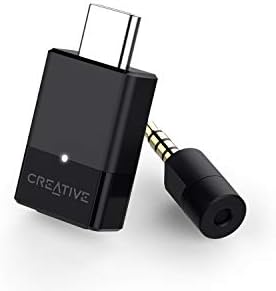
- • Supports 4 different Bluetooth codecs\u2014aptx LL, aptx HD, aptx, and SBC. With the codec selection button and indicator light, you can easily switch to your desired codec with a simple button press.
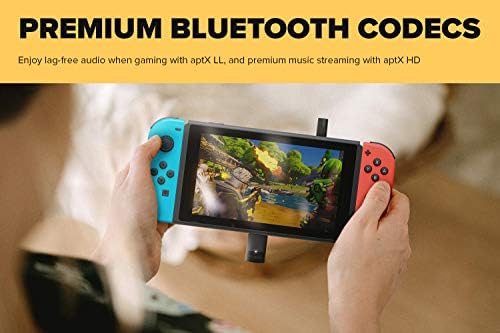
- • Real time Audio Sync: with aptX low latency compatible, you can enjoy real-time audio sync when you are playing games or watching a HD movie.
- • Simple Plug and Play: no driver or software installation required. Powered by USB-C connection, simply plug into your device to enjoy High quality wireless audio. Support Multiple devices.
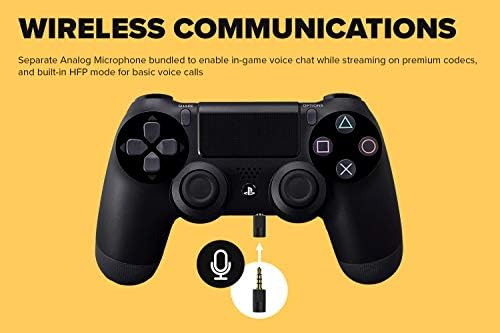
- • Communicate wirelessly: includes a mini analog mic for you to enjoy seamless voice chat with your team wirelessly for HFP mode compatible devices.
Compare CREATIVE BT-W3 Bluetooth 5.0 USB-C Audio Transmitter Wireless Adapter Dongle, aptX LL and aptX HD, Compatible with PS4, Switch, Laptop, PC, Tablet and Mac with other products:


Description
devices, or upgrade your existing Bluetooth
listening experience with BT-W3! Creative BT-W3 is a portable Bluetooth
audio transmitter equipped with the latest Bluetooth
version 5.0 and advanced audio codecs like aptX LL and aptX HD.
Codec indication and selection
Creative BT-W3 supports multiple audio codecs, each useful for different situations. It also comes with an indicator light and codec selection button, so you can easily tell which codec you’re using, and switch to the most suitable codec effortlessly.
Low Latency Audio
Say goodbye to out-of-sync audio and hello to seamless real-time audio sync! With aptX Low Latency, the time lag is reduced to an indiscernible amount of 30-40 ms. When playing games or watching movies, switch the codec on BT-W3 to aptX LL, as indicated by the white light, to enjoy lag-free audio!
Plug and play
Designed to be a hassle-free Bluetooth upgrade, BT-W3 is truly plug-and-play for your utmost convenience! Simply plug it into the device you want to use it with, and connect your Bluetooth headset to it. BT-W3 does not require any battery and draws a minimal amount of power from the connected device.
Voice Chat Support
Plug in the analog microphone to the 3.5 mm jack on your device to communicate wirelessly! The analog mic enables you to use BT-W3 on an advanced codec like aptX LL, while using voice chat at the same time. If your Bluetooth headset comes with built-in mic, BT-W3 also allows you to make a quick call simply by switching to HFP mode as well.
Frequently Asked Questions
1. How do I know if my headphones or speakers are compatible with the codecs offered by Creative BT-W3?
To be able to use the aptX codecs, your playback device has to support the respective codecs. If you're unsure of the codecs supported by your devices, you can check their compatibility with aptX codecs on the aptX website.
If your playback device does not support aptX codecs, it can still connect with Creative BT-W3 via the SBC codec, which is the basic Bluetooth codec supported by all Bluetooth headphones or speakers. However, you will not be able to enjoy the higher audio quality of the aptX codecs.
2. How do I use Creative BT-W3 with PS4 or Nintendo Switch in dock mode?
Simply connect Creative BT-W3 to the USB C-to-A converter provided, and plug it into one of the USB-A ports on the PlayStation console or Nintendo Switch dock to enjoy wireless gaming!
3. Can I use the Analog Microphone included with my Nintendo Switch?
For the analog microphone to work with Nintendo Switch, you’d have to download the HFP-off firmware to enable the function. Do note that enabling the analog mic for Nintendo Switch will turn off the HFP mode on your Creative BT-W3. This is necessary because the Nintendo Switch does not allow for input and output audio to be from different devices. When HFP mode is enabled on your BT-W3, the Switch will auto-register it as the input device, and the analog microphone, or any other external microphones, cannot be enabled.
Please also note that its voice chat function is title-dependent. You can use the microphone with games that have built-in chat function like Fortnite and Overwatch. Otherwise, it will not work for Nintendo Switch.
4. Can I control volume through my Bluetooth headphones while connected to Creative BT-W3?
For Bluetooth headphones with the AVRCP profile, you can control playback volume through your Bluetooth headphones. For devices without AVRCP profile, you might only be adjusting the volume of your headphones, not the device Creative BT-W3 is connected to. The volume control synchronization between headset and connected device is dependent on headset manufacturer’s implementation.
5. Will BT-W3 draw a lot of power from my phone or Nintendo Switch in handheld mode?
No, the Creative BT-W3 draws less than 40mA even when using the most power-intensive codec. That is about 1% of most phones’ battery, and less than 1% of Nintendo Switch’s battery.
6. Why is my BT-W3 unable to pair with my device?
Some Bluetooth devices broadcast their pairing aggressively and this forces BT-W3 to exit pairing mode. To avoid this problem, turn off Bluetooth on your PC, Mac, PS4 or Nintendo Switch temporarily if you experience difficulty.
7. Can I use the mic from my Bluetooth headphones for voice call instead of the analog microphone?
Yes, you can use your Bluetooth headset for calls in HFP mode, which can be activated by pressing the button on Creative BT-W3 twice. The LED indicator will turn solid red, indicating HFP mode is active. Do note that in HFP mode, the high-quality audio streaming capabilities of A2DP Bluetooth codecs (i.e. aptX LL, aptX HD, aptX, and SBC) will not be available. This is because HFP is a different Bluetooth profile which supports voice back, while A2DP does not.
The analog microphone will allow you to use voice chat while streaming audio on A2DP codecs at the same time. However, due to it being a near-field microphone, it is not suitable for use with laptops and computers due to the position of the 3.5 mm audio jack, and the likelihood of it picking up your keyboard sounds.
Bluetooth Version
5.0
2.1 + EDR
Codecs Supported
aptX LL, aptX HD, aptX, SBC
aptX LL, aptX, SBC, FastStream
Codec Indicator
LED Light
NA
Codec Selection
Yes
NA
Voice Chat Option
Analog Microphone, HFP Mode
FastStream codec
Device Compatibility — Playback
PS4, Nintendo Switch, PC, Mac
PS4, Nintendo Switch, PC, Mac
Device Compatibility — Voice Chat
Both Analog Mic and HFP Mode: PS4, PC, Mac. HFP Mode only: Nintendo Switch.
Only with FastStream-enabled headphones
Connectivity
USB-C
USB-A
Product information
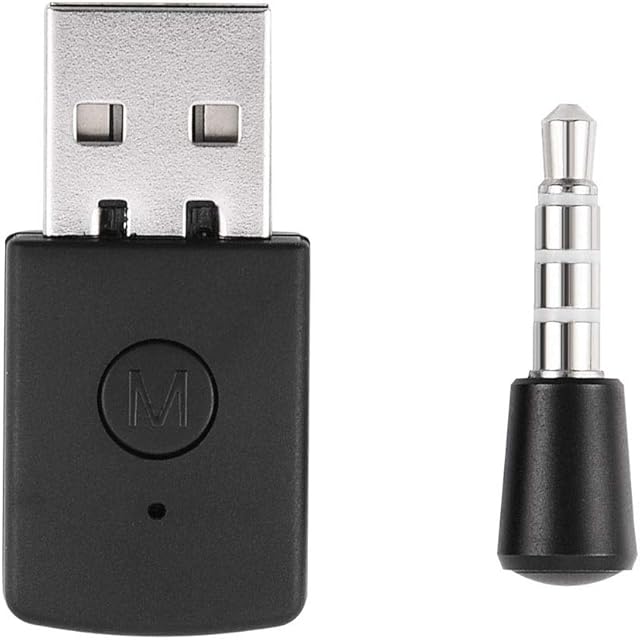
- Special feature:Bluetooth 5 . 0
- Size:Black_USB_Type_C
- Brand:CREATIVE
- Connectivity technology:Bluetooth
- Input device interface:USB,Bluetooth
- Product Dimensions:3 x 1.5 x 0.6 cm; 44 Grams
- Item model number:SA0160
- Manufacturer:Creative Labs
- Wireless Type:Bluetooth
- Power Source:Corded Electric
- Are Batteries Included:No
- Item Weight:44 g
Related products to CREATIVE BT-W3 Bluetooth 5.0 USB-C Audio Transmitter Wireless Adapter Dongle, aptX LL and aptX HD, Compatible with PS4, Switch, Laptop, PC, Tablet and Mac:


Explore other categories
Other products from Bluetooth Network Adapters: