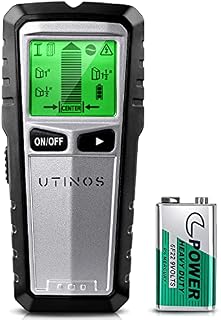
UTINOS Stud Finder 5 in 1 Multi-function Upgraded Smart Stud Sensor, Wall Scanner with AC Wire Warning for Locating Center & Edge of Studs or Metal and AC Wire Detection by Amazon.co.uk
Currently Unavailable
Description
Stud Scan
Stud scan is designed to detect locates center,edges, and direction of wood studs upto 1 1/2 in. (38mm) deep:
1. Stud 1/2 in. scan: Locateds the center and edges of wood and metal studs up to 1/2 in. (13mm) deep
2. Stud 1 in. scan: Locateds the center and edges of wood and metal studs up to 1 in. (25mm) deep
3. Stud 1 1/2 in. scan: Locateds the center and edges of wood and metal studs up to 1 1/2 in. (38mm) deep
Metal Scan
Metal scan locates hazards such as pipes behid walls up to 2.36 in. (60mm) deep:
First scan 1 in scan mode (or Stud ½ in. Stud 1 ½ in.), find the location, pick up the stud finder, in the air, press the mode switch button to switch to metal mode, then repeat the previous to determine the location of metal objects faster.
AC Wire Scan
AC wire scan to identify live AC electrical wiring up to 2 in. (51mm) deep
Note: For Safety, this wall scanner always detect Live AC Wire in all modes. Whatever Mode, the AC warning Icon will flash when live, unshielded wires are detected.
Tips for using UTINOS stud finder
When you press the scan button, youre calibrating for density. So make sure that you dont depress the button before you put the stud finder on to the wall and see the bar display come on.
Dont let other objects get near the stud finder once its been calibrated. Even a pencil or finger.
Dont calibrating too quickly. Need to give it time to calibrate properly.
Dont do a lot of twisting when you putting the stud finder on the wall. Keep it move at a nice steady pace when calibrating.
Step 1. Calibration
Place the stud finder on the wall, press and hold the scan button to start calibration, the decreasing bars will disappear and buzzer will beep one time and the calibration is completed.
Step 2. Moving
Slowly slide tool across the wall. A bottom pointed arrow and edge indication will illuminate, indication location of the stud edge.
Step 3. Locate Stud Center
Continue sliding the tool. When the center of a stud is located, the full bars on the signal strengthe indicator, the pointed arrow on the top of the bar, the center indication will all show and the buzzer will sound.
Product information
- Manufacturer:Fuzhou Yu Xin Electronic Co., Ltd
- Part Number:TH430
- Product Dimensions:16.41 x 7.49 x 3.4 cm; 260 Grams
- Batteries:1 9V batteries required.
- Manufacturer reference:TH430
- Material:Metal
- Power Source:Battery-Powered
- Included Components:1 9V batteries included
- Batteries included?:No
- Batteries Required?:No
- Battery Cell Type:Alkaline
- Item Weight:260 g
Related products to UTINOS Stud Finder 5 in 1 Multi-function Upgraded Smart Stud Sensor, Wall Scanner with AC Wire Warning for Locating Center & Edge of Studs or Metal and AC Wire Detection:


Explore other categories
Other products from Scanners & Testers:
![[Upgrade] Wood Moisture Meter, Dr.meter 2 in 1 Pin & Pinless Multifunctional Firewood/Wall/Building/Furniture Humidity Water Detector, Pin-Type & Scanner Wood Moisture Tester](https://m.media-amazon.com/images/I/61QL8xpkP7L._AC_SL640_.jpg)