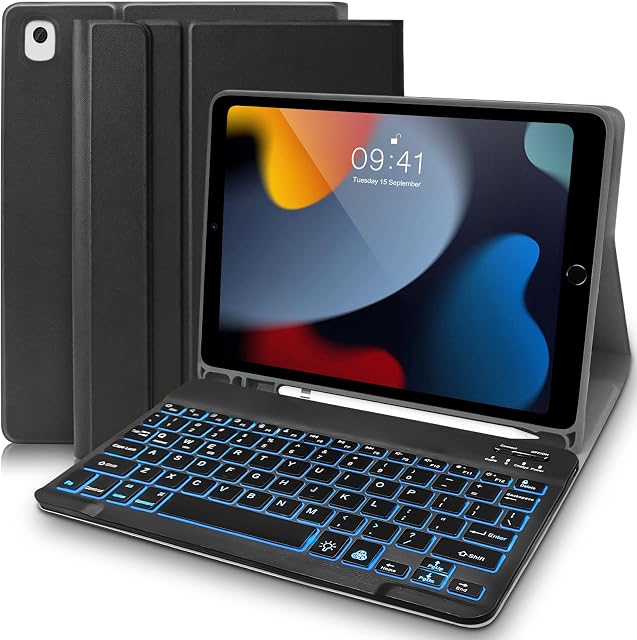
Seagtigau Keyboard Case with Trackpad for iPad 10.2" 9th Gen 2021/8th Gen 2020/7th Gen 2019/iPad Air 3 10.5"/iPad Pro 10.5", Ultra-Slim Wireless Keyboard Cover with Touchpad by Amazon.co.uk
- • 【Compatible Devices】 This keyboard case is specially designed for iPad 10.2&10.5 inch. Compatible with iPad 9th 10.2" 2021(A2602/A2603/A2604/A2605), for IPad 8th 10.2 inch 2020 (A2270/A2428/A2429/A2430), for iPad 7th Generation 10.2" 2019 (A2197/A2198/A2200), for iPad Air 3 10.5" 2019 (A2152/A2123/A2153) and for iPad Pro 10.5" 2017 (A1701/A1709/A1852).
- • 【How to connect Blue/tooth?】To turn on the keyboard by Long press the power button for 3 seconds. If your device does not recognize the keyboard bluetooth automatically, please press “FN+Z” to activate Bluetooth and then connect it. (You just need to activate the bluetooth (Fn + Z) only ONCE when you use this keyboard for the first time, after then you do NOT need to activate the bluetooth and your device will be connected automatically.)
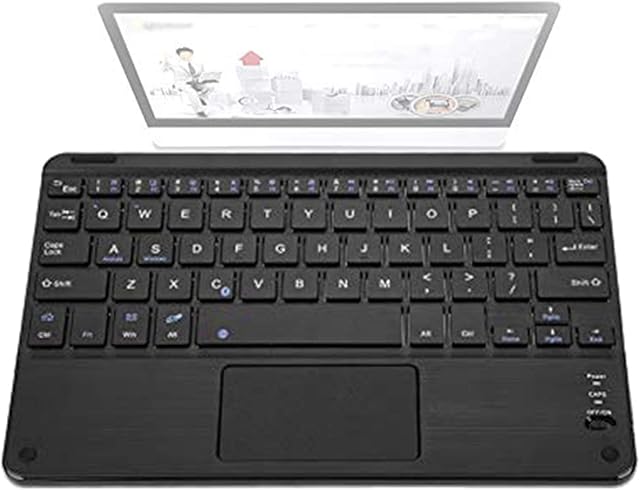
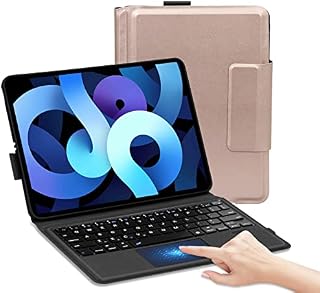
- • 【Wireless Keyboard with Trackpad】 Equipped with a large area clickable trackpad which allows you to navigate and control the cursor like a laptop, no need have to touch the screen or additional mouse. Perfect for working, writing, reading or watching videos. The trackpad can be locked/unlocked by pressing “FN + space” keys.
- • 【Built-in Pencil Holder& Rechargeable Keyboard】This iPad 7th/8th/9th generation case with keyboard is built-in pencil holder which is convenient to carry and easy to use. The keyboard USB charge cables are attached with parcel. After 2-3 hours full charge, wireless keyboard continuously working for 30 hours / standby for 100 days. Notes: to save energy and extent battery life, it will enter into sleep mode automatically if not in use for 15 minutes and you just need to press any key to wake up.
- • 【Precise Cutouts & Full Protection】 This versatile and thoughtful tablet case keyboard is specially designed for iPad 10.2"/10.5". Precise cutout allows full access to all ports, user interface, sensors, speakers, microphone and cameras. With premium & smooth TPU material, this keyboard tablet case offers full protection against scratches, bumps or dents and protects your tablet from all sorts of dropping accidents.
- • 【Battery Indicator】After the power turned on, the first 3 indicators light on simultaneously and the third indicator is Red, Please do not worry, the battery is no problem. The third red indicator means the battery is working which does not means the battery power is low. When the fourth indicator flashes in Red light, it means the battery power is low.
- • 【How to Use the Trackpad and Update the Touchpad Sensitivity?】To use the trackpad, please make sure the AssistiveTouhch on your iPad is open ( find Setting---Accessibility---Touch---AssistiveTouch)---On & make sure the trackpad unlocked ( Fn + Space bar). How to adjust the Touchpad Sensitivity : Setting---Accessibility---Touch---AssistiveTouch---TRACKING SENSITIVITY.
- • 【How to use the shortcut function?】 Switch language: Fn + earth key (on the right of space bar), £: Shift +3(UK)/Alt + 3(US), Cut: Fn + X, Copy: FN + C, Paste: FN + V. Other shortcuts can be combined with "FN“ or “shift” key.
- • 【How to do if the bluetooth disconnect?】If re-activate the bluetooth by accident during using, the bluetooth will disconnect. Please forget the previous bluetooth device name (Click exclamation mark -- forget the device) --- restart the iPad’s bluetooth -- Find “Bluetooth keyboard” in search list and then connect it.
Compare Seagtigau Keyboard Case with Trackpad for iPad 10.2" 9th Gen 2021/8th Gen 2020/7th Gen 2019/iPad Air 3 10.5"/iPad Pro 10.5", Ultra-Slim Wireless Keyboard Cover with Touchpad with other products:


Description
1) To use the touchpad function, please make sure that your iPad's AssistiveTouch
is open.
(Please find Setting---Accessibility---Touch---AssistiveTouch---On)
2) If the touchpad is not very sensitive, please adjust the Sensitivity
in your iPad:
(Setting---Accessibility---Touch---AssistiveTouch---TRACKING SENSITIVITY.)
3) Please use the original charging cable
we provided in the package.
( Not compatible with Fast charging cable which will damage the battery of the keyboard.)
ATTENTION: After the power turned on, the first 3 indicators light on simultaneously and the third indicator is Red
, Please do not worry, the battery is no problem
. The third red indicator means the battery power is working
which does not means the battery is low. When the fourth indicator
flashes in Red light, it means the battery power is low
.
How to Connect the Smart Wireless Keyboard?
For the first time
to use:
Step 1: Fully charge the keyboard for 2-3 hours.
Step 2: Long press the power button for 3 seconds to turn on the keyboard.
Step 3: Turn on your iPad's bluetooth and please press “FN+Z”
to activate Bluetooth.
(You just need to activate the bluetooth (Fn + Z) only ONCE
when you use this keyboard for the first time, after then you do NOT
need to activate the bluetooth and your device will be detect automatically.)
Step 4: Find the "Bluetooth Keyboard" on your iPad and connect it.
For daily use
:
1. Do NOT need to activate the keyboard's bluetooth each time. The bluetooth will be pairing automatically after first activation.
2. If you pressed Fn + Z key to activate the bluetooth again by accident and the bluetooth disconnected
,, please forget the previous bluetooth device name
(Click exclamation mark -- forget the device) and then connect the “bluetooth keyboard” of the search list
.
| | | | |||||||||||||||||||||||||||||||
|---|---|---|---|---|---|---|---|---|---|---|---|---|---|---|---|---|---|---|---|---|---|---|---|---|---|---|---|---|---|---|---|---|---|
| Sensitive Trackpad for iPad 9th/8th/7th/Air 3/Pro 10.5'' Equipped with a large area clickable trackpad which allows you to navigate and control the cursor like a laptop, no need to touch the iPad’s screen or use additional mouse. Notice: the trackpad can be locked/unlocked by pressing “FN + Space” keys together. To use the touchpad, please make sure the AssistiveTouhch on your iPad is open. | How to use the Shortcuts? All blue icon keys should be pressed with "FN" . FN + Z : Activate Bluetooth FN + Space: Lock/unlock trackpad. Space + Earth button (right of the space button): Switch Languages. FN + C : Copy FN + V: Paste | Premium material & Full Protection With premium & durable TPU material, this keyboard tablet case offers full protection against scratches, bumps or dents and protects your tablet from all sorts of dropping accidents. Precise cutout allows full access to all ports, user interface, sensors, speakers, microphone and cameras.
|