
Controller Buttons
Shop Controller Buttons products from multiple suppliers.

About Controller Buttons
In the world of gaming, the controller is an essential tool that allows players to fully immerse themselves in the virtual world. From the classic Nintendo consoles to the modern PlayStation and Xbox, controllers have evolved over the years to provide a more seamless and immersive gaming experience. One crucial component of any controller is the buttons. Without them, navigating through menus, executing moves, and interacting with the game would be nearly impossible. In this blog post, we will delve into the world of controller buttons, exploring their importance, types, and the latest innovations in the gaming industry.
Importance of Controller Buttons
Controller buttons are the primary means of input for gamers. They allow players to control their in-game characters, perform actions, and interact with the game world. Imagine playing a game without buttons – it would be like trying to drive a car without a steering wheel. The buttons on a controller provide tactile feedback, allowing players to feel the actions they are performing. Whether it's pressing a button to shoot a weapon or pressing a combination of buttons to execute a special move, controller buttons are vital for gameplay.
Types of Controller Buttons
There are several types of controller buttons, each serving a specific purpose in gameplay. The most common types of buttons found on controllers include:
1. Action Buttons: These buttons are used to perform various in-game actions such as jumping, attacking, or interacting with objects. They are usually labeled with symbols like letters (A, B, X, Y) or shapes (circle, square, triangle, cross) depending on the console.
2. Directional Buttons: Also known as D-pads, these buttons provide directional input. They are typically arranged in a cross or disc shape and allow players to move their characters in different directions.
3. Shoulder Buttons: These buttons are located on the top of the controller and are often used for secondary actions such as aiming, blocking, or activating special abilities. They are usually labeled as L1, L2, R1, R2 or with shoulder icons.
4. Analog Sticks: While not technically buttons, analog sticks play a crucial role in controlling characters' movement. They provide smooth and precise input, allowing players to navigate through the game world with ease.
5. Start and Select Buttons: These buttons are used to pause the game, access menus, and perform various functions depending on the game. They are usually located in the center or bottom of the controller.
Innovations in Controller Buttons
As technology continues to evolve, so do controller buttons. Video game console manufacturers are constantly striving to improve the gaming experience by introducing innovative features to their controllers. Here are some notable innovations in controller buttons:
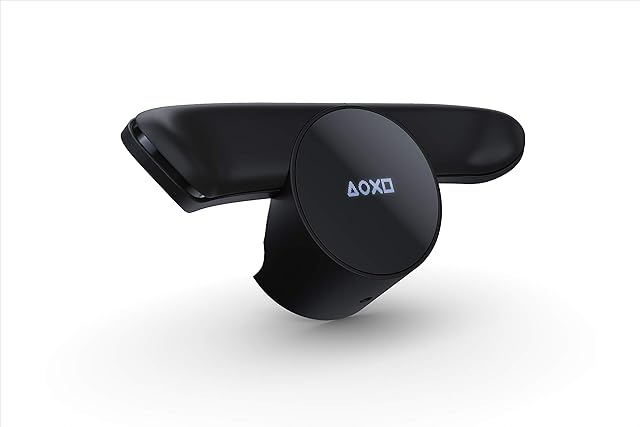
1. Back Buttons: Sony's DualShock 4 Back Button Controller Attachment is a prime example of this innovation. It adds two additional buttons to the back of the controller, allowing for more input options and customization. These buttons can be mapped to any other button on the controller, providing players with a competitive edge in games that require quick reflexes.
2. Pressure-Sensitive Buttons: The PlayStation 2's DualShock 2 controller introduced pressure-sensitive buttons. These buttons could detect the amount of pressure applied, allowing for more nuanced gameplay. For example, in a racing game, the amount of pressure applied to the accelerator button could determine the speed of the vehicle.
3. Adaptive Triggers: The PlayStation 5's DualSense controller takes innovation to a whole new level with adaptive triggers. These triggers provide varying levels of resistance, simulating the feel of different in-game actions. For instance, drawing a bowstring in a game will require more force compared to pulling a trigger on a gun.
Controller Button Accessories
Apart from the advancements in controller buttons themselves, there is also a wide range of accessories available to enhance the gaming experience. These accessories include replacement buttons, joystick repair kits, and more. For example, the Venom Xbox Elite Series 2 Controller Accessory Kit offers a blue color option for the Xbox Elite Series 2 controller, allowing gamers to customize their controller's appearance. The 2-Pack 3D Joycon Joystick Replacement by ABLEWE provides a convenient solution for replacing faulty joycon joysticks on the Nintendo Switch, ensuring smooth and precise control during gameplay.
Controller buttons are an integral part of the gaming experience. They provide the means for players to interact with the game world, executing actions and controlling characters. With constant advancements in technology, controller buttons have evolved to offer more immersive and customizable experiences. Whether it's the addition of back buttons, pressure-sensitive buttons, or adaptive triggers, these innovations continue to push the boundaries of gaming. So, the next time you pick up a controller, take a moment to appreciate the intricate design and functionality of the buttons that make your gaming adventures possible.