

Rechargeable Wireless Mouse, 2.4G & Bluetooth Mouse Slim Portable Cordless Ergonomic Mouse for Laptop, PC, Computer, Windows Android OS Tablet (Black) by Amazon.co.uk
- • 【Dual Mode Wireless Connection】Bluetooth 4.0/ 2.4G dual mode wireless mouse connection switch easily. Bluetooth cordless 4.0 brings quick response, precise movement, stable connection & smoother tracking. 2.4G plug&play with USB nano receiver. (USB receiver stored in the bottom of the mouse)
- • 【Rechargeable Wireless Mouse】Rechargeable mouse built-In an 480mah Lithium ion battery, charge 1 hour and work for 2 months.Save you the cost of buying battery.
- • 【Slim&Comfortable Design】Slim wireless mouse with slim ergonomic design and smooth surface, this wireless Bluetooth mouse fits comfortably and perfectly in your hands, providing an incredible user experience. Tested over 5 million times keystroke lifespan ensures long-term and stable use.
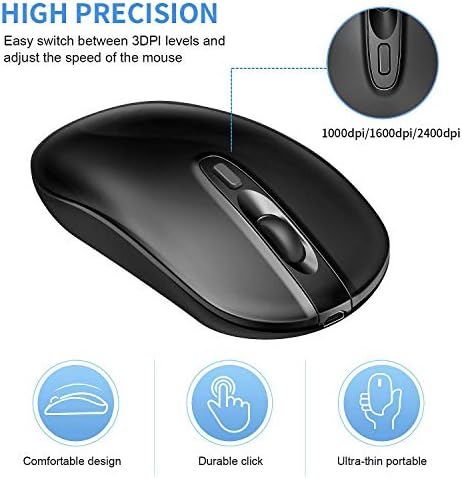
- • 【High Sensitivity/Speed】Optical wireless mouse with 3 adjustable DPI Values 2400/1600/1000 levels to suit both ordinary and gaming mouse needs.
- • 【Wide Compatibility】Bluetooth 4.0 mode works with Windows / Android / OS system. No code required and intelligent connectivity. 2.4GHz mode works with laptop, desktop or any device with USB port, simply plug the USB receiver, plug and play.
Compare Rechargeable Wireless Mouse, 2.4G & Bluetooth Mouse Slim Portable Cordless Ergonomic Mouse for Laptop, PC, Computer, Windows Android OS Tablet (Black) with other products:


Description
Build-in 480mAh rechargeable battery, fully charge the computer mouse with the USB cable, also you can charge while you using. When recharging, flashing indicator will be red, when charging fully, flashing indicator will be out. System
Windows-suggest above Windows8.0 Mac OS-suggest above MacOS10.10 Android-suggest above Android4.3 Mode Switch Indication
.The LED on scroll wheel : Red light is 2.4G mode, blue light is BT mode. .Short-press(1 second) \u201cPairing Button\u201d(2.4G/BT) at the bottom of mouse, the LED on scroll wheel slow flashes means mode switch. .Long-press(for 3 seconds) \u201cPairing Button\u201d, the LED on scroll wheel quickly flashes means paring mode. 2.4G Wireless & Bluetooth Mode Connection Tips
1.Plug the USB receiver into USB port and turn mouse switch to \u201cON\u201d. 2.Red led light blink once indicating 2.4G wireless connected successfully. 3.If the wireless mouse is on the 2.4G mode currently and need switch to bluetooth mouse mode, please open the device bluetooth first, then please long-press and hold the mouse \u201cPairing Button\u201d more than 3 seconds to enter the pairing state, the blue LED of scroll wheel will flashes quickly (indicate that mouse is searching bluetooth sigal). 4.Search the BT name on device: BT4.0.+2.4G Mouse 5.First time must CLICK paring (use another available mouse that can click on computer) for BT transmission, after successfully, the BT mode will be workable. 6.After connection, whatever from 2.4G to BT mode or from BT to 2.4G mode, only short-press the \u201cPairing Button\u201d to switch mode. 7.After first time BT connection, only need short-press \u201cPairing Button\u201d switch to bluetooth mode, the bluetooth will connect last time same device directly.
Rechargeable Dual Mode Wireless Mouse
Build-in 480mAh rechargeable battery, fully charge the computer mouse with the USB cable, also you can charge while you using. When recharging, flashing indicator will be red, when charging fully, flashing indicator will be out. System
Windows-suggest above Windows8.0 Mac OS-suggest above MacOS10.10 Android-suggest above Android4.3 Mode Switch Indication
.The LED on scroll wheel : Red light is 2.4G mode, blue light is BT mode. .Short-press(1 second) \u201cPairing Button\u201d(2.4G/BT) at the bottom of mouse, the LED on scroll wheel slow flashes means mode switch. .Long-press(for 3 seconds) \u201cPairing Button\u201d, the LED on scroll wheel quickly flashes means paring mode. 2.4G Wireless & Bluetooth Mode Connection Tips
1.Plug the USB receiver into USB port and turn mouse switch to \u201cON\u201d. 2.Red led light blink once indicating 2.4G wireless connected successfully. 3.If the wireless mouse is on the 2.4G mode currently and need switch to bluetooth mouse mode, please open the device bluetooth first, then please long-press and hold the mouse \u201cPairing Button\u201d more than 3 seconds to enter the pairing state, the blue LED of scroll wheel will flashes quickly (indicate that mouse is searching bluetooth sigal). 4.Search the BT name on device: BT4.0.+2.4G Mouse 5.First time must CLICK paring (use another available mouse that can click on computer) for BT transmission, after successfully, the BT mode will be workable. 6.After connection, whatever from 2.4G to BT mode or from BT to 2.4G mode, only short-press the \u201cPairing Button\u201d to switch mode. 7.After first time BT connection, only need short-press \u201cPairing Button\u201d switch to bluetooth mode, the bluetooth will connect last time same device directly.
Product information
- Brand:cimetech
- Colour:Black
- Connectivity technology:Bluetooth, USB
- Special feature:Wireless, Portable, Rechargeable, Ergonomic Design, Soundless, LED Lights
- Movement detection technology:Optical
Related products to Rechargeable Wireless Mouse, 2.4G & Bluetooth Mouse Slim Portable Cordless Ergonomic Mouse for Laptop, PC, Computer, Windows Android OS Tablet (Black):

Explore other categories
Other products from Mice: